Screen recorder for Windows
画面録画機 2026年製Select frame:
Price: $9.99 once. No subscription.
Record any part of your screen
Teleframe puts a frame on your desktop. Drag it where you want it, size it to any shape and press REC. Only what's inside the frame goes into the video, and the recorder's own controls never appear in it. Try it free for 7 days.
Free for 7 days with every feature. Windows 10 and 11. One-time purchase.
By buying Teleframe, you agree to the purchase terms below.
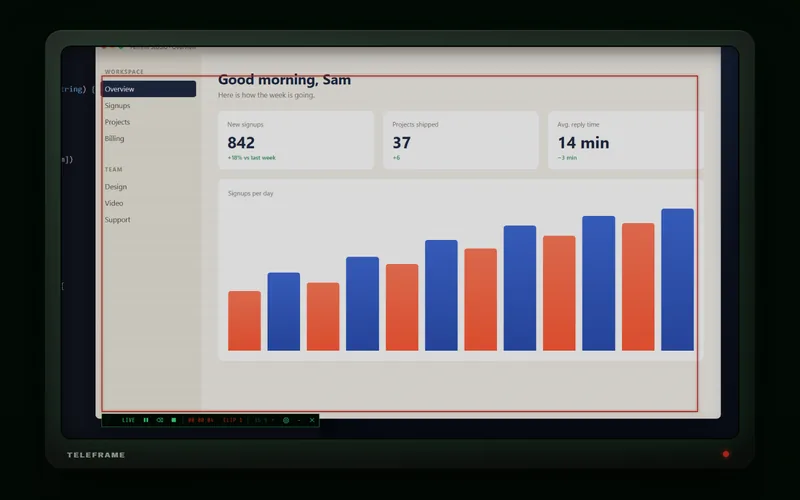
A frame you can put anywhere
Pick a shape from the control strip: 16:9 for YouTube, 9:16 for Reels, TikTok and Shorts, or 1:1, 4:3, 4:5, 21:9, a free shape or the whole monitor.
Drag a corner to resize and the ratio holds. You can move the frame while you record, and the video follows it.

Pause, cut the bad take, save

Every stretch between REC and pause becomes a clip. Fluffed a line? Delete the last clip and record it again.
When you press stop, Teleframe joins the clips into one MP4 in a few seconds. It copies the video as it is, so nothing is re-encoded.
The controls sit on one thin line under the frame. Collapse them to a single button when you want a clean screen.
What's in it
- Quality
- Five presets from LOW to MAX, at 30 or 60 fps. Settings shows the file size per minute before you record.
- Sound
- Off, system sound, your microphone, or both mixed.
- Hotkeys
- Ctrl+Alt+R record, Ctrl+Alt+P pause, Ctrl+Alt+D delete the last clip, Ctrl+Alt+S save, Ctrl+Alt+H hide the controls. You can change them.
- Output
- H.264 MP4, encoded on your graphics card when it can. Saved to the folder you choose.
- Watermark
- None.
- System
- 64-bit Windows 10 (version 2004 or newer) or Windows 11. The app's interface is in English.

One price, paid once
$9.99
No subscription and no account. After paying, your license key appears on screen and is emailed to you. One key works on up to 3 PCs.
Checkout by Stripe. Prices are shown in your local currency where available.
By buying Teleframe, you agree to the purchase terms below.
Questions
Is there a free trial?
Yes. Download Teleframe and use every feature free for 7 days. When the trial ends, enter a license key to keep recording.
How does the license key work?
After you buy, you get a key that starts with TELE-. In Teleframe, click the gear, choose LICENSE and paste it. One key works on up to 3 PCs. Activation needs the internet once, and after that Teleframe works offline.
Is Teleframe a subscription?
No. You pay once, and the copy you download is yours to keep. There's no account to make.
Does Teleframe add a watermark?
No. The video contains what was inside the frame and nothing else.
Can it record sound?
Yes. In settings, choose system sound, your microphone, or both mixed together. Sound is saved as AAC at 192 kbps, about 1.4 MB per minute.
Can I record vertical video for TikTok, Reels and Shorts?
Yes. Choose 9:16 and the frame turns into a tall rectangle. Put it over the part of the screen you want and press REC.
Where are my recordings saved?
In the folder you pick in settings, which is Videos\Teleframe until you change it. Each recording is an MP4 named with the date and time.
How big are the files?
That depends on the frame size and the quality setting. At HIGH and 60 fps, a minute of 1080p video is about 113 MB. Settings shows the estimate for your frame before you start.
Windows says it protected my PC. What do I do?
The installer isn't code-signed, so Windows SmartScreen may warn you the first time you run it. Click More info, then Run anyway.
Does Teleframe work on a Mac?
No. Teleframe runs on 64-bit Windows 10 (version 2004 or newer) and Windows 11.
I lost my license key.
Open the download page and enter the email you paid with. Your key will be sent to that address again.
Purchase terms
Buying Teleframe gets you a license key for up to 3 PCs, for personal or commercial work. Payments are handled by Stripe, and lf.wtf never sees your card number.
By buying Teleframe, you agree to occasional emails about related products. You can unsubscribe at any time.